


Bootloader Unlock Tool for Windows & Android Brand Guides
Bootloader Unlock Tool for Windows & Android Brand Guides
Available to order
Couldn't load pickup availability
Good to know
Digital tool for an eligible Google Pixel. OEM unlocking must be available; unlocking erases user data. No handset or ROM installation is included.
A Windows bootloader unlock tool with Android brand instructions. PrivacyPortal Bootloader 2.1.1 brings device checks, data-wipe confirmations and unlock-status verification into one interface. Its automatic USB workflow is for eligible Google Pixels; the brand guide helps owners of other Android phones find their manufacturer's process.
Check before buying: your exact phone must permit OEM unlocking. Unlocking erases its data. Read the free Android unlock-tool comparison and manufacturer guide to choose the right route.
Which part can you use with your phone?
- Eligible Google Pixel: the guided Windows workflow checks a recognised device, requests its documented unlock and verifies its reported state. Exact carrier, region and firmware restrictions still apply.
- Xiaomi, Redmi, POCO, Motorola, Sony, Fairphone and other Android brands: use the in-app manufacturer instructions and official links. These are manual routes; the EXE does not execute their unlock procedures or provide vendor unlock codes.
- OEM unlocking unavailable or permission refused: check the manufacturer or carrier first. This purchase cannot make a restricted phone unlockable.
Why buy an interface when Fastboot is free?
Google's Android SDK Platform-Tools and the documented Fastboot method are free to obtain. PrivacyPortal adds a guided interface for eligible Pixels, deliberate erase confirmations, status checks, a one-PC licence and a support contact. You are paying for that software workflow, rather than extra unlocking permission.
What the app checks
- Requires one directly connected USB device; rejects wireless ADB, multiple devices, unknown models and fastbootd.
- Reads the device identity, bootloader state and OEM unlock eligibility before an unlock request.
- Requires ownership and backup acknowledgements plus the word ERASE. The phone requires its own confirmation.
- Requests an unlock once, then checks the device's reported unlocked state. It does not automatically retry an unlock.
- Provides a separate restart action and a support report saved locally when requested.
Android instructions included
The brand selector covers Google Pixel; Xiaomi, Redmi and POCO; Motorola; Sony Xperia; Fairphone; OnePlus; Nothing and CMF; and Samsung. It also explains how to assess Huawei, Honor, ASUS, OPPO, Realme, Vivo, HMD, LG and an unidentified Android device when no current method has been verified. An offline HTML guide is included.
Some manufacturers require an account approval, a waiting period, a device-specific code or their own utility. Some devices have no supported route. Check the manufacturer compatibility matrix; a brand appearing in the guide does not mean automatic unlocking is supported.
Requirements and what you receive
- PC: Windows 10 or 11, 64-bit x64. This EXE does not run on macOS, Linux, Windows ARM or Android. The current Windows build is unsigned.
- Phone for the automatic workflow: an eligible, recognised Google Pixel with OEM unlocking enabled. Check the exact model and carrier variant before buying.
- USB: a reliable data cable, the appropriate Windows driver, USB debugging enabled and the computer approved on the phone.
- Delivery: a valid email address for the Windows ZIP download link and a separate licence-key email. Extract the complete ZIP, including the bundled Google platform-tools.
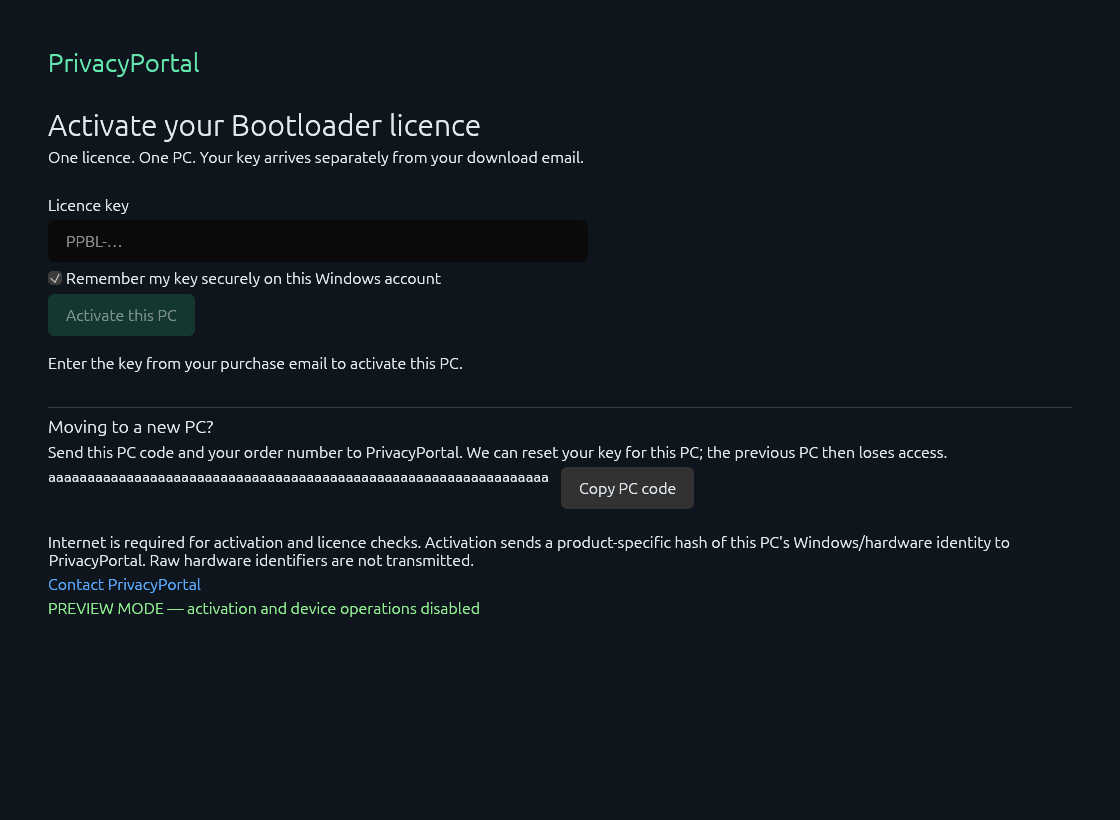
- Activation: one key pairs with one PC. Internet access is required for activation and licence checks before device operations.
- Included: the app, platform-tools, setup and brand instructions, and one-PC software licence. No phone, cable, remote appointment, ROM installation or root-manager licence is included.
How the Pixel workflow works
- Confirm that your exact phone permits OEM unlocking. Back up files, app data and recovery codes.
- Extract the purchase ZIP, open the EXE and activate it using the key from your separate email.
- Connect one Pixel by USB, approve debugging and run the device check.
- Enter bootloader mode and review the identity, state and eligibility checks. Stop if any check fails.
- Complete the data-erase confirmations, request the unlock and confirm physically on the phone.
- Wait for the phone, then use Verify status. Restart only after the app confirms the reported unlocked state.
Questions before you download
Does it unlock Samsung, Xiaomi or every Android automatically?
No. Those phones have manufacturer instructions in the app and free guide. The executable's automatic USB operations are limited to eligible Pixels. A software licence is separate from a Motorola or Sony unlock code and from Xiaomi authorisation.
Does Android 14, 15 or 16 determine compatibility?
An Android version number alone is insufficient. Check the exact model, carrier or region, installed firmware and manufacturer's current method. The app rejects devices it cannot recognise or verify. Contact support before purchase if eligibility is unclear.
Can it fix greyed-out OEM unlocking or remove FRP?
No. It cannot bypass OEM permission, Google account verification, Factory Reset Protection, a screen lock, SIM/network lock or organisation policy. See the guide's connection and eligibility troubleshooting before paying for any tool.
What if my phone is not detected?
Check that the USB cable carries data, install the correct Windows driver, disconnect other Android devices and approve the debugging prompt. Android/ADB and bootloader/Fastboot use different interfaces. Stop on an unknown-device or eligibility error; send support the exact model and message.
Can I move the licence to a replacement PC?
Send your order number and the new PC code shown by the app to admin@privacyportal.co.uk. Support can reset the pairing for that PC; the previous PC loses access. Licence checks use a product-specific PC identity hash rather than raw hardware identifiers.
Does unlocking install Magisk, GrapheneOS or a custom ROM?
No. Rooting and OS installation are separate procedures. Follow the chosen project's exact-model instructions. Unlocking changes the phone's security state and may affect apps that check device integrity. This app does not flash firmware, unlock critical partitions or relock the bootloader.
Missing your download link or key?
Check the email address used at checkout and contact PrivacyPortal support with the order number if either message is missing. Download links are available for 90 days; contact support for help after expiry.
Release and download verification
Current release: 2.1.1 for Windows x64. The ZIP is 13,657,391 bytes. Its SHA-256 is 00301153d29d063be247e24763d69427de38db5ea4d24dbb2914babd232ece10. A matching hash identifies the supplied archive; it does not establish handset eligibility or replace Windows code signing.
The screens shown are captures of the application in labelled preview states. Physical handset acceptance testing and Windows signing remain outstanding; no across-device success rate is claimed.
Learn what bootloader unlocking changes, compare free and paid tool routes, or browse bootloader software and tools. PrivacyPortal is independent of Google and the listed phone manufacturers.


Customer feedback
Have feedback on this product? Share your experience below.
Write a review
Thanks — your review has been received. We verify it against your order and it appears on the site once approved.