

By the PrivacyPortal team — current as of June 2026.
If you have ever flashed a root module and wondered how it runs code inside other apps, the answer is almost always Zygisk. The name is a blend of "Zygote" and "Magisk", and it describes the framework that lets Magisk and its modules hook into Android's app-spawning process. Knowing what Zygisk is — and how Zygote injection actually works — is the key to everything from running LSPosed to hiding root from fussy apps. In this guide we cover what Zygisk does, the three implementations you can pick from (built-in Magisk Zygisk, Zygisk Next and ReZygisk), and a real, follow-along install you can try on your own device today.
If you would rather start with root already in place, our pre-rooted Android phones arrive rooted with Magisk and tested before dispatch, with the exact setup listed.
Before you touch anything: rooting and modifying system behaviour can brick your phone, break over-the-air (OTA) updates, void your warranty and trip Play Integrity — which can stop banking apps and Google Wallet from working. Back up everything first, and remember that unlocking the bootloader wipes the device completely. Nothing here defeats any specific bank's checks; treat all of it as you modifying your own hardware, at your own risk.
What is Zygisk? Zygote plus Magisk, explained
To understand Zygisk, you first have to understand Zygote — one of the most important processes in Android.
What is the Zygote process?
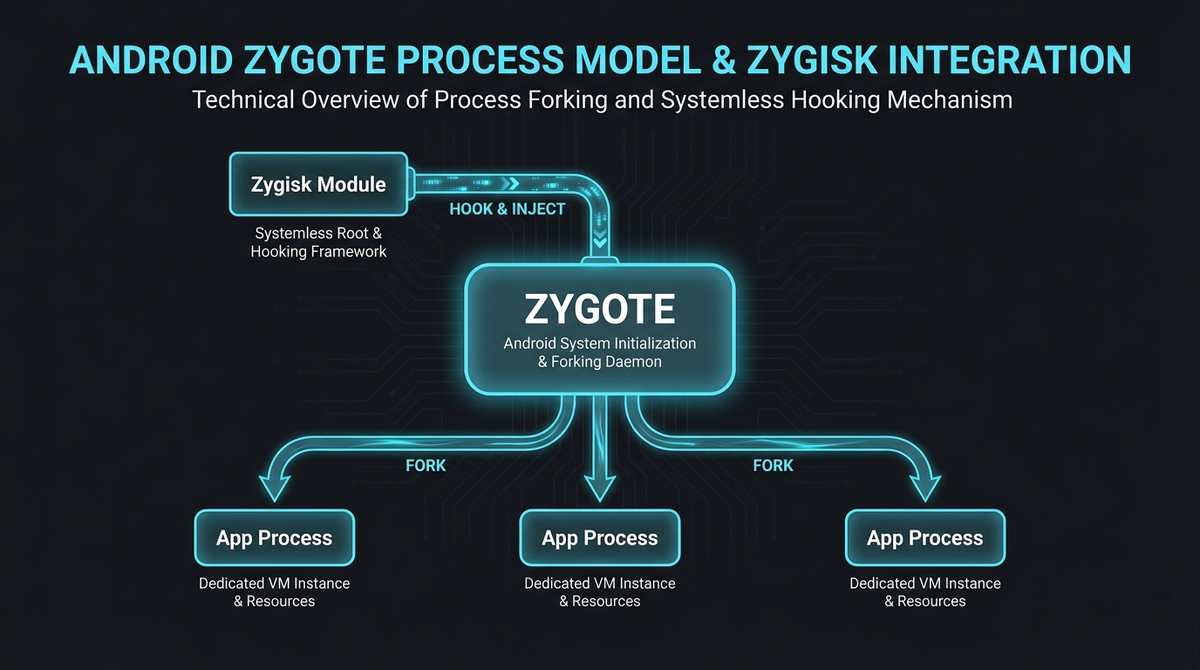
When Android boots, it starts a process called Zygote. Zygote preloads the Android Runtime (ART) along with the common framework classes and libraries that almost every app needs, then sits idle, waiting. Each time you open an app, the system does not start from scratch — it forks (clones) Zygote, and the new copy becomes your app's process, inheriting everything Zygote already loaded. That is why apps launch quickly, and it is why the process is named after the single cell that everything else divides from. Zygote is part of the Android Open Source Project's runtime architecture.
How Zygisk injects code into Zygote
Here is the clever part. Because every app process is a child of Zygote, anything injected into Zygote can run inside every app that launches afterwards. Zygisk is Magisk's official API for doing exactly that — loading small native modules into Zygote, and therefore into individual app processes. It arrived in Magisk v24.0, replacing the older Riru method, and it is described in Magisk's official documentation. In practice, Zygisk is what lets a module alter how an app behaves, change what an app sees, or quietly unmount Magisk's modifications before a security-conscious app goes looking for them.
How Zygisk injects a module into each app process forked from the Zygote template.
What "Zygote-isolated" actually means
The full name behind the abbreviation is "Zygote-isolated", and the isolation is the point. A Zygisk module gets a callback the moment a new app process is forked — before the target app's own code runs — and from there it operates inside that single app's sandbox rather than scattering changes across the system partition. Modules can also run heavier work in a separate companion process, keeping the code that sits inside your apps as small as possible. A tidy, per-app footprint is also an easy footprint to revert, which is why the concealment modules further down this page build on Zygisk instead of reinventing injection themselves.
Zygisk vs Riru: why Magisk made the switch
Before Zygisk existed, the community standard for Zygote injection was Riru. Riru worked by replacing a native system library that Zygote loads, then using that swapped library as its entry point to inject code. It was ingenious and very widely used, but it carried two structural problems: it needed a separate Riru "core" plus Riru-specific builds of every plugin, and the modified system library was itself something an app could go looking for.
Zygisk folded the same capability directly into Magisk, so there is no extra core to install and no swapped library sitting on disk. The comparison most people are actually asking about — Zygisk vs Riru — comes down to this:
| Aspect | Riru (legacy) | Zygisk (current) |
|---|---|---|
| Injection method | Replaces a native system library that Zygote loads | Built into Magisk's daemon; injects at the fork |
| Dependencies | Riru core plus a Riru-specific build of each module | Native to Magisk v24.0 and later |
| Maintenance | Largely deprecated since 2022 | Actively maintained; the API new modules target |
| Where it stands today | Effectively retired | The standard |
For anything you set up today this is not really a choice: new modules are written against the Zygisk API, so Riru is not the path forward. The only reason to know it exists is that old forum threads and old module downloads still assume it — if a module insists on a Riru core, you are looking at something written for a Magisk that shipped years ago.
What Zygisk is actually used for
On its own, Zygisk does nothing visible — it is plumbing. The value comes from Zygisk modules that use the API. The most common ones you will meet are:
- LSPosed — runs the Xposed framework on modern Android, so you can hook and tweak app behaviour without editing each app.
- Hiding modules such as Shamiko, NoHello or Treat Wheel — these reduce the traces that root leaves behind in selected apps.
- Play Integrity Fix / Play Integrity Fork — used to help a device report a sensible state to Google's Play Integrity API.
The Zygisk DenyList
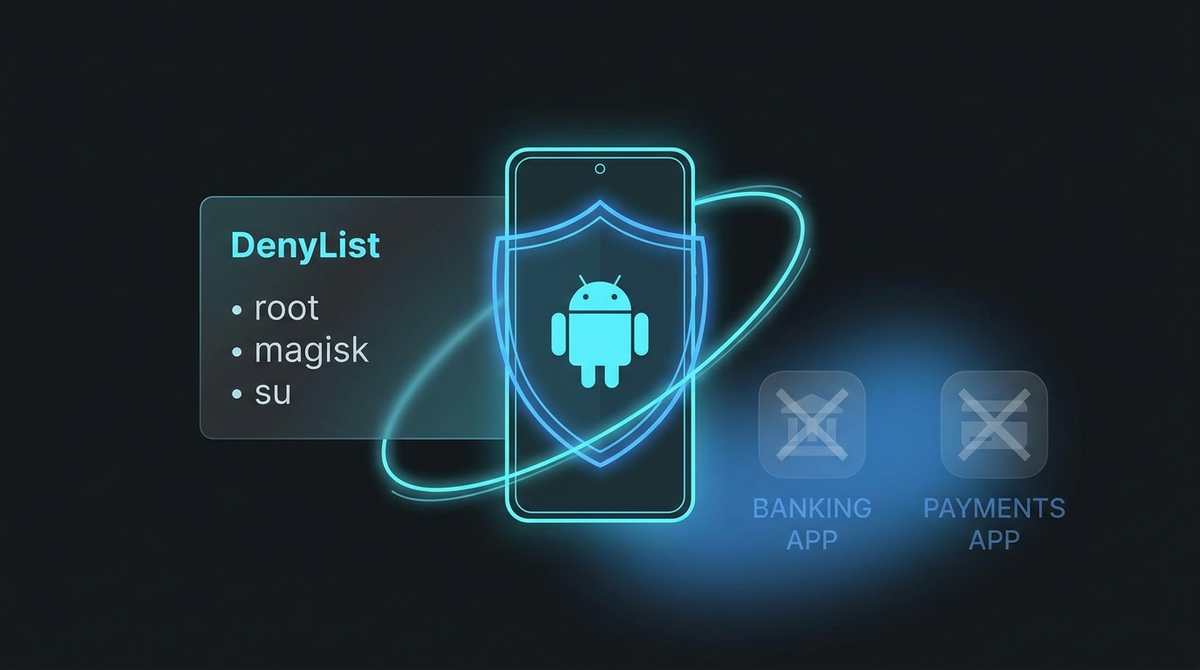
The Zygisk DenyList is a built-in Magisk feature that tells Zygisk to revert its modifications and avoid loading into the processes of apps you choose — typically banking and payment apps. In practice the DenyList is a baseline, not an invisibility cloak: simpler checks are satisfied, but more sophisticated detection still sees clues. That gap is exactly why dedicated hiding modules and alternative Zygisk implementations exist.
Zygisk vs MagiskHide: how the DenyList replaced it
If you have followed an older guide you will have run into MagiskHide — the all-in-one hiding system Magisk used to ship. The same v24.0 release that introduced Zygisk also removed it. What replaced it is the DenyList: a single "Enforce DenyList" toggle plus a per-app checklist, with Magisk unmounting and reverting its modifications inside the processes you tick.
The change of philosophy matters more than the change of name. MagiskHide tried to cloak root globally, everywhere, all the time. The DenyList does close to the opposite — it reverts changes in the specific apps you nominate and leaves everything else alone. That makes it targeted, predictable and much easier to reason about when something breaks, but it is also, quite deliberately, not a promise that any particular app will be satisfied.
| Aspect | MagiskHide (removed) | Zygisk DenyList (current) |
|---|---|---|
| Approach | Global cloaking, always on | Per-app, opt-in list |
| Scope | System-wide | Only the processes you tick |
| Configured by | Its own hide list and logic | "Enforce DenyList" plus "Configure DenyList" |
| Status | Removed in Magisk v24.0 | The built-in baseline |
Two practical consequences. First, if a tutorial tells you to "enable MagiskHide", it predates 2022 and describes a menu that no longer exists — read the rest of it sceptically. Second, because the DenyList is a baseline rather than a cloak, it is the floor of what is possible and not the ceiling; that is precisely why the dedicated hiding modules and the alternative Zygisk implementations in the next section exist at all. Would you rather have a device that arrives already configured? We list rooted Android phones with Magisk set up.
The three Zygisk implementations compared
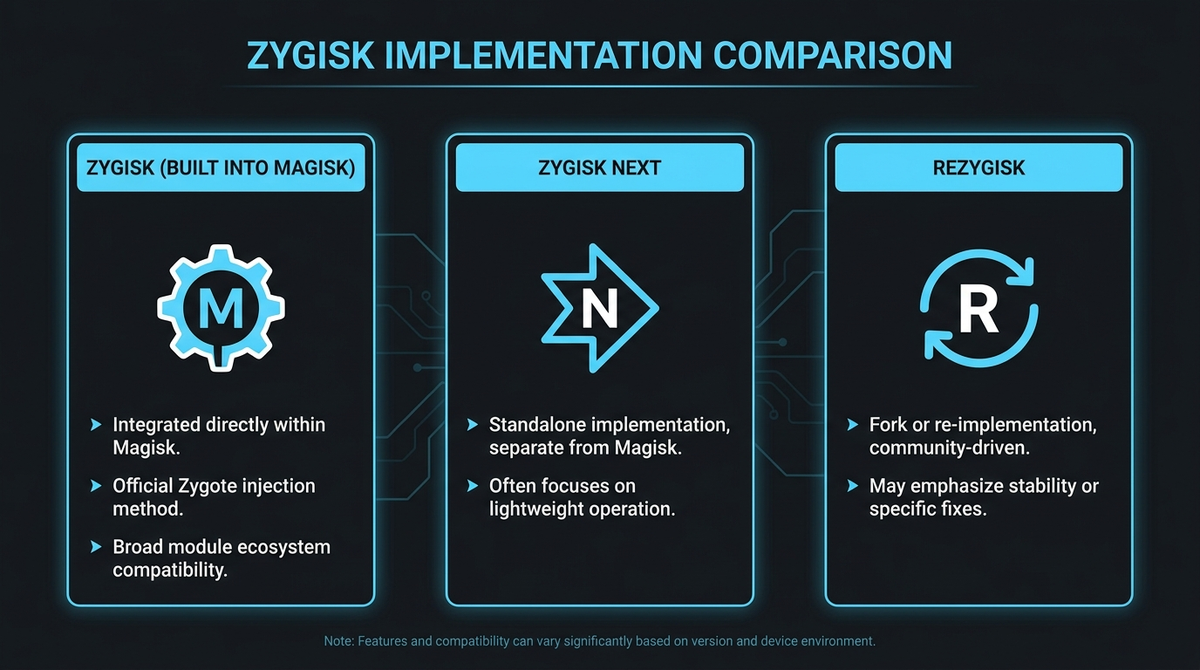
This is where most confusion starts. "Zygisk" is not a single thing any more — there are three implementations (plus a newer alternative), and choosing the right one depends on your root manager.
- Built-in Magisk Zygisk — the original, toggled on in Magisk's settings. Convenient, but the easiest of the three for apps to detect.
- Zygisk Next — a standalone, closed-source module (maintained by Dr-TSNG) that brings Zygisk to Magisk, KernelSU and APatch. Long the community default, though some banking apps have started detecting it.
- ReZygisk — an open-source implementation by PerformanC that supports every major root manager and hides its traces more aggressively.
- NeoZygisk (by JingMatrix) — a newer open-source alternative in the same spirit as ReZygisk.
| Implementation | Maintainer | Open source | Works with | Hides root | Use this hider |
|---|---|---|---|---|---|
| Built-in Magisk Zygisk | topjohnwu | Yes | Magisk only | Weak — easily detected | Shamiko |
| Zygisk Next | Dr-TSNG | No | Magisk, KernelSU, APatch | Moderate — some detection now | Shamiko |
| ReZygisk | PerformanC | Yes | Magisk, KSU-Next, APatch, SukiSU | Strong | NoHello / Treat Wheel |
| NeoZygisk | JingMatrix | Yes | Magisk, KernelSU, APatch | Strong | NoHello |
Worth spelling out, because it trips people up constantly: Magisk is the only root manager with Zygisk built in. KernelSU, KernelSU-Next, APatch and SukiSU root the device by patching the kernel rather than the boot ramdisk, and none of them ship Zygisk themselves. If you are on one of those, the Zygisk API arrives as a separate module — ReZygisk, NeoZygisk or Zygisk Next — and until you install one, Zygisk modules such as LSPosed simply have nothing to load into.
| Your setup | Native Zygisk? | How to get the Zygisk API |
|---|---|---|
| Magisk v24.0 or newer | Yes | Enable the Zygisk toggle in Settings |
| Magisk before v24.0 | No | Update to a current Magisk |
| KernelSU / KernelSU-Next | No | Install ReZygisk, NeoZygisk or Zygisk Next |
| APatch | No | Install ReZygisk, NeoZygisk or Zygisk Next |
| SukiSU Ultra | No | Install ReZygisk |
A root manager's Modules screen showing a standalone Zygisk implementation installed and active.
ReZygisk vs Zygisk Next: which should you use?
There is no single winner — it depends on your stack. Here is the decision framework we actually use:
- You run Magisk and mainly want LSPosed plus light hiding: built-in Zygisk or Zygisk Next, paired with Shamiko, is the simplest route.
- You run KernelSU-Next, APatch or SukiSU Ultra: use ReZygisk (or NeoZygisk). Zygisk Next works too, but ReZygisk is built with these managers in mind.
- You are on a SUSFS-patched kernel: ReZygisk is the better-behaved choice.
- Zygisk Next has started getting detected for you: switch to ReZygisk, which hides Zygisk traces more aggressively so apps are fooled into thinking no Zygisk is present.
Should you turn Zygisk on at all?
| If you… | Then… |
|---|---|
| Only need root for backups, ad-blocking or automation | You may not need Zygisk at all — leave it off |
| Run a module that requires the Zygisk API | Enable Zygisk; it is the prerequisite |
| Want targeted root reversion in specific apps | Enable Zygisk + Enforce DenyList |
| Expect Zygisk to silently beat every bank app | Reset expectations — that is not guaranteed |
The single most important compatibility rule: Shamiko does not work with ReZygisk. If you choose ReZygisk, use NoHello or Treat Wheel instead — mixing Shamiko with ReZygisk is the classic cause of "my hiding suddenly broke". For the bigger picture, see our guide to passing Play Integrity on a rooted phone.
How to install ReZygisk (step-by-step)
This walkthrough installs ReZygisk, the implementation most worth knowing in 2026. The exact files are linked in the Modules, apps & files to try section at the end of this article, so download them from there rather than hunting around.
Prerequisites
- An unlocked bootloader and a working root manager already installed — Magisk, KernelSU-Next, APatch or SukiSU Ultra. (New to this? Start with our Magisk rooting guide.)
- A current backup of anything you cannot lose.
- The ReZygisk module. v1.0.0-rc.2 is a known-working release; the newer CI builds are distributed via the project's Telegram channel rather than GitHub Releases, so check the files section below for the right link.
- A compatible hiding module — NoHello or Treat Wheel (not Shamiko).
The steps
- Back up first. Take a fresh backup before changing anything.
- Disable any existing Zygisk. If you use Magisk, open it and turn off the built-in Zygisk toggle in Settings. If you previously installed Zygisk Next, remove it. You must never run two Zygisk implementations at once.
- Download ReZygisk from the files section below, choosing the build that matches your setup.
- Flash the module. In your root manager, go to Modules → Install from storage and select the ReZygisk ZIP.
- Reboot. Zygisk changes only take effect after a restart.
- Verify it is running. Reopen your root manager, go to Modules, and check the ReZygisk card — it should report that the daemon is active and list your device's architecture(s). This is the step most people skip, and it is the one that tells you whether Zygisk is genuinely live.
- Add your hiding module. Flash NoHello or Treat Wheel, then reboot again.
- Do a functional test. Install a Zygisk module such as LSPosed and confirm it loads — if it does, Zygote injection is working end to end.
The ReZygisk module card after a reboot, showing the daemon running and the detected device architectures.
What actually happens if it goes wrong: on some Magisk builds, ReZygisk modules silently refuse to load. The community fix is to hide (rename) the Magisk app from Magisk's settings, then reboot — this resolves module loading surprisingly often. If you are on Magisk Alpha, expect the occasional rough edge with ReZygisk; it works, but it is less seamless than KernelSU-Next.
If you are staying on built-in Magisk Zygisk instead
Not everyone needs a standalone implementation. If you are on Magisk and simply want the built-in one, the sequence is shorter:
- Confirm the Magisk app reports v24.0 or newer.
- Open Settings (the cog) and toggle Zygisk on.
- Optionally turn on Enforce DenyList, then open Configure DenyList and tick the apps you want reverted.
- Reboot.
- Reopen Magisk and confirm the home screen reads Zygisk: Yes — that line is the confirmation, not the toggle.
- Install your first module from Modules → Install from storage, then reboot again.
- Test that the module actually does something, rather than just appearing in the list.
Common Zygisk pitfalls (and how to avoid them)
- Running two Zygisks at once. Built-in Magisk Zygisk plus ReZygisk (or Zygisk Next) will fight each other. Disable the built-in one first.
- Pairing Shamiko with ReZygisk. They are incompatible. Use NoHello or Treat Wheel with ReZygisk.
- Looking for ReZygisk on GitHub Releases. The freshest builds come from the project's CI channel on Telegram; the tagged v1.0.0-rc.2 is your fallback.
- Enabling Magisk's "enforce DenyList" alongside Shamiko. In some setups these clash — turning the enforce option on can break Shamiko's hiding.
- Following a guide that says "MagiskHide". It was removed in v24.0. Anything written around it is old enough to be wrong about other things too.
- Chasing a Riru build of a module. Modern modules target the Zygisk API; a module that still needs a Riru core is not the one you want.
- Forgetting to reboot. Almost every Zygisk problem report turns out to be a missing reboot.
- Assuming Zygisk is automatically the safer setting. Some apps probe for Zygisk specifically, so switching it on changes what they see rather than simply hiding more.
- Expecting magic. No Zygisk setup guarantees a given banking app will work; detection is a moving target and the cat-and-mouse never truly ends. Where a check is rooted in secure hardware, software-side work does not reliably move it at all.
Frequently asked questions
What is Zygisk in simple terms?
Zygisk is the part of Magisk that lets root modules run code inside other apps, by hooking into Android's Zygote process — the template that every app is cloned from. No Zygisk, no LSPosed and no modern root hiding.
Do I need Zygisk?
Only if you want features that depend on it: the Xposed framework via LSPosed, advanced root hiding, or Play Integrity fixes. If you simply want root for a file manager or ad-blocker, you can leave Zygisk off.
Is Zygisk safe?
Zygisk itself is mature, but it increases your attack surface and only loads the modules you give it. Install modules from sources you trust, keep backups, and remember that root plus Zygisk can affect device integrity checks. Treat every module as code running inside your apps — because it is.
Zygisk vs Riru — which should I use?
Zygisk. Riru's library-replacement approach has been effectively retired since Magisk v24.0 folded Zygote injection in natively, and modules are now written against the Zygisk API rather than Riru's. If you find something that still demands a Riru core, it is old.
What happened to MagiskHide?
It was removed in Magisk v24.0, the same release that introduced Zygisk. The DenyList took its place: instead of trying to cloak root globally, you tick individual apps and Magisk reverts its modifications in those processes only.
ReZygisk vs Zygisk Next — what is the real difference?
Zygisk Next is closed-source and has been the default for Magisk users; ReZygisk is open-source, supports more root managers, and currently hides Zygisk traces more aggressively. The catch is that ReZygisk does not work with Shamiko, so you move to NoHello or Treat Wheel.
Can I use Zygisk without Magisk?
Yes. Standalone implementations like ReZygisk, Zygisk Next and NeoZygisk bring the Zygisk API to KernelSU-Next, APatch and SukiSU Ultra, so you are not tied to Magisk to use Zygisk modules.
Does enabling Zygisk break OTA updates?
Zygisk is not usually the culprit — being rooted with a patched boot image is what breaks seamless OTAs. The normal workflow is to restore the stock boot image, take the update, then re-patch and reinstate your modules. Plan for that before you update rather than after.
Will Zygisk make my banking app work again?
Maybe, maybe not — and we will not pretend otherwise. Detection methods change constantly, and we cannot promise any setup defeats a specific bank's checks. Where a check is anchored in hardware-backed attestation, software-side concealment is increasingly a losing battle. If staying off the treadmill appeals, a de-Googled phone sidesteps Google's services entirely rather than trying to hide from them.
Zygisk is the quiet engine behind most of what makes a modern rooted Android phone powerful. Learn how Zygote injection works once, pick the implementation that matches your root manager, and the rest of the ecosystem — modules, hiding, integrity — finally makes sense. Grab the files below and try it on your own device.


