

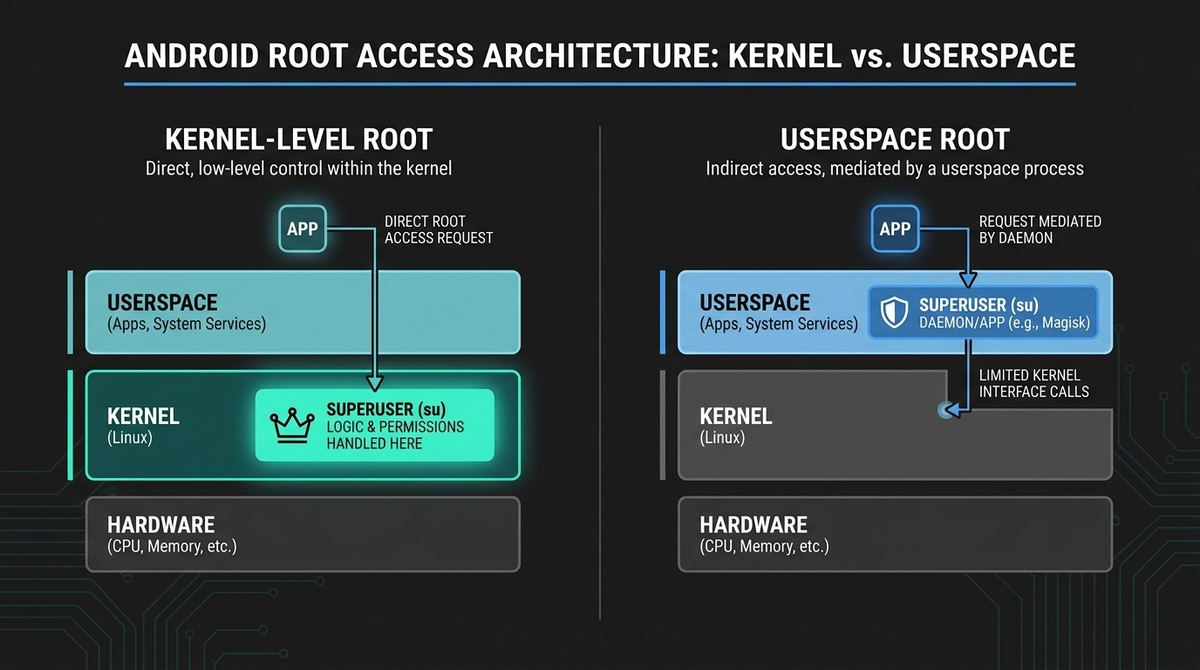
If you have looked into rooting an Android phone recently, you will have seen kernelsu mentioned alongside Magisk. KernelSU is a kernel-based root solution: instead of patching the boot image in user space the way Magisk does, it builds the root logic directly into the Linux kernel that runs your device. This guide explains what KernelSU is, how it differs from its busy fork KernelSU-Next, which phones it works on, and the genuine risks involved — written plainly, with no hype, for people who want to understand their own device before they change anything on it.
One thing to settle up front: rooting is something you do to a phone you own and control. Done carefully it gives you real ownership of the device. Done carelessly it can leave you with an expensive brick, a tripped warranty, or banking apps that refuse to run. Read the risks section before you flash anything.
What is KernelSU?
KernelSU is an open-source root manager that implements su (the command that grants superuser rights) and an access-control system inside the kernel itself. Because the kernel sits below every app and even below most of the operating system, root that lives there is harder for ordinary apps to detect or interfere with, and it can enforce permission rules that user-space tools cannot.
The original project, maintained by the developer "tiann", reached version 3.2.4 in April 2025. Its sister project, KernelSU-Next (a community fork), reached v3.2.0 in April 2026 and is the more actively broadening of the two. They share the same core idea but differ in scope, which we will come to shortly.
KernelSU's standout feature is its App Profile system. This is a kernel-enforced, per-app permission model: you decide exactly which apps may use root, and you can restrict each one's UID, GID, Linux capabilities and even its SELinux context. This is more granular than Magisk's user-space DenyList, because the restrictions are applied by the kernel rather than negotiated in user space.
How kernel-based root differs from Magisk
Magisk patches the boot image and runs its magic in user space once Android has started. KernelSU bakes root into the kernel, so it is present from the moment the kernel loads. That architectural difference produces several practical distinctions.
| Aspect | KernelSU / KernelSU-Next | Magisk |
|---|---|---|
| Where root lives | In the kernel | User space, via patched boot image |
| Device requirement | GKI 2.0 kernel (5.10+), or a custom-built kernel for older devices | Works on almost any device with an unlockable bootloader |
| Permission control | App Profile — kernel-enforced, per-app | DenyList — user-space |
| Zygisk (code injection) | Not built in; needs ZygiskNext or ReZygisk | Built in (toggleable) |
| Module mounting | OverlayFS or Magic Mount (switchable) | Magic Mount |
Neither is simply "better". Magisk is the more universal choice and works on a much wider range of hardware. KernelSU and its forks shine on modern GKI devices where their kernel-level approach gives stronger isolation and, when paired with the right add-ons, more thorough hiding. The two cannot run at the same time — if you switch from Magisk to KernelSU you must fully uninstall Magisk first.
GKI 2.0, and why your device matters
The single biggest factor in whether KernelSU will work is your kernel. GKI (Generic Kernel Image) 2.0 is a standardised kernel format that Google mandated for devices launching with Android 12 and later. It requires kernel 5.10 or newer with a stable Kernel Module Interface (KMI), written in the form 5.10-android12-9.
A crucial nuance: GKI 2.0 applies to devices that launched on Android 12+, not to older phones that were merely updated to Android 12. A device that shipped on Android 11 with an older kernel will not qualify even after an update. If your phone launched with Android 12 or later, you are very likely on a clean GKI 2.0 kernel and the modern install path is open to you.
GKI mode vs LKM mode
KernelSU can be installed two ways:
- GKI mode replaces the entire kernel (boot.img). You download or build a kernel image that exactly matches your device's KMI and security patch level, then flash it.
-
LKM mode (Loadable Kernel Module) leaves the kernel in place and patches
init_boot.imgso a small.komodule loads into the running kernel. This is the preferred path on modern devices: there is no KMI mismatch risk and recovery after an update is simpler.
An important correction to a widely repeated claim: in the original tiann/KernelSU project, direct kernel (GKI/built-in) integration is being actively phased out, not merely de-emphasised. The maintainer has stated that built-in integration will no longer be compiled or tested, existing compatibility code will be gradually removed, and third-party kernel maintainers are discouraged from integrating it directly. If you want the built-in/GKI route on older or non-GKI hardware, KernelSU-Next is the branch that still pursues it.
Another commonly oversimplified point: init_boot exists on devices that launched with Android 13. A phone that launched on Android 12 and was later updated to 13 keeps the Android 12 partition layout and does not have a separate init_boot partition. Check your device's actual layout rather than assuming "Android 13 means init_boot".
KernelSU vs KernelSU-Next: which branch?
Both branches deliver kernel-based root with the App Profile system. The difference is reach and pace.
- KernelSU (tiann): narrowing its scope to aarch64 GKI 2.0 with the official Driver Development Kit. Non-GKI support was dropped at v1.0 (v0.9.5 was the last version with it), and x86_64 maintenance is being wound down.
- KernelSU-Next: the fork that keeps broadening compatibility. It retains support for older non-GKI kernels in the 4.x–5.4 range via kernel-source integration, ships pre-built modules across a range of GKI kernels, and has built-in SUSFS controls for hiding. Its homepage documents GKI support up to kernel 6.6, with 6.6 and above marked experimental.
Two accuracy notes worth carrying with you. First, claims that KernelSU-Next officially supports kernel 6.12 / Android 16 are not backed by the project's own documentation as of mid-2026 — treat any 6.6+ or Android 16 reports as experimental. Second, x86_64 users should be careful: KernelSU-Next's v3.2.0 changelog noted that recent x86_64 kernels can trigger a kernel panic in the KernelSU layer, so emulator and some Chromebook scenarios need verification.
For most people on a modern phone the practical answer is: if your device is a clean GKI 2.0 model with good support, either branch works; if your device is older, non-GKI, or you want the most active feature development and built-in hiding, KernelSU-Next is usually the better fit.
Supported devices and the awkward cases
GKI 2.0 means KernelSU-family root can run on phones from many OEMs — Google, OnePlus, Realme, Xiaomi, Nothing and others — provided the bootloader can be unlocked. The detail is in the device-specific landmines:
- Google Pixel: the best-supported path. Pixel 6 and later use GKI 2.0 properly and LKM mode works cleanly. Pixels enforce anti-rollback, so only flash a kernel whose security patch level matches or is newer than your current firmware.
- Samsung: unlocking the bootloader trips the Knox e-fuse permanently (a one-way 0x1 counter). That disables Samsung Pay and some Knox features for good and voids the Samsung warranty. One UI kernels are often modified in ways that break KMI compatibility, and US Snapdragon carrier models frequently cannot be unlocked at all.
- Xiaomi / POCO / Redmi: unlocking needs the Mi Unlock tool plus a waiting period (often 7–72 hours) after binding the device to a Mi account. HyperOS added stronger anti-root checks in 2025.
- MediaTek GKI devices: non-standard KMI handling means some show "Unsupported" in the manager despite running kernel 5.10+. Check a device-specific thread first.
- Huawei / Honor: no public bootloader unlock since 2018–2020. KernelSU is effectively not installable.
- GrapheneOS: KernelSU is incompatible by design — its hardened verified boot rejects unsigned kernels. Do not try to combine the two.
If you would rather skip the device-by-device research and the unlock waiting games entirely, this is exactly the gap PrivacyPortal exists to fill: we sell de-Googled, privacy-first Android phones set up properly from the start, and we are happy to advise on whether a given handset is a sensible candidate for root before you commit to anything.
Installing KernelSU: the overview
This is a map, not a per-device manual — always follow the guide for your exact model and firmware.
-
Back up first. Save your stock
boot.imgandinit_boot.imgbefore touching anything. This is your lifeline if a flash goes wrong. - Unlock the bootloader. This wipes all data on the device and, on some OEMs, is irreversible. Back up your files separately.
- Install the manager APK (KernelSU or KernelSU-Next). Open it. It will report "Not installed" (GKI supported — safe to proceed), "Unsupported" (you will need a custom kernel build), or your current status.
-
Choose your path. LKM mode on modern GKI devices with an
init_bootpartition; GKI mode on older Android 12 GKI devices without one. -
LKM mode: patch your backed-up
init_boot.imgwith the manager (or theksudCLI) and flash it via fastboot. -
GKI mode: download the pre-built
boot.imgthat exactly matches your KMI and security patch level, then flash via fastboot or a kernel flasher. - Non-GKI (KernelSU-Next only): clone your kernel source, integrate the driver, compile, and flash the result. This is advanced and unsupported for most devices.
- First boot: let it boot fully, open the manager, confirm the version shows, and grant root to the manager if asked.
Modules, Zygisk and hiding
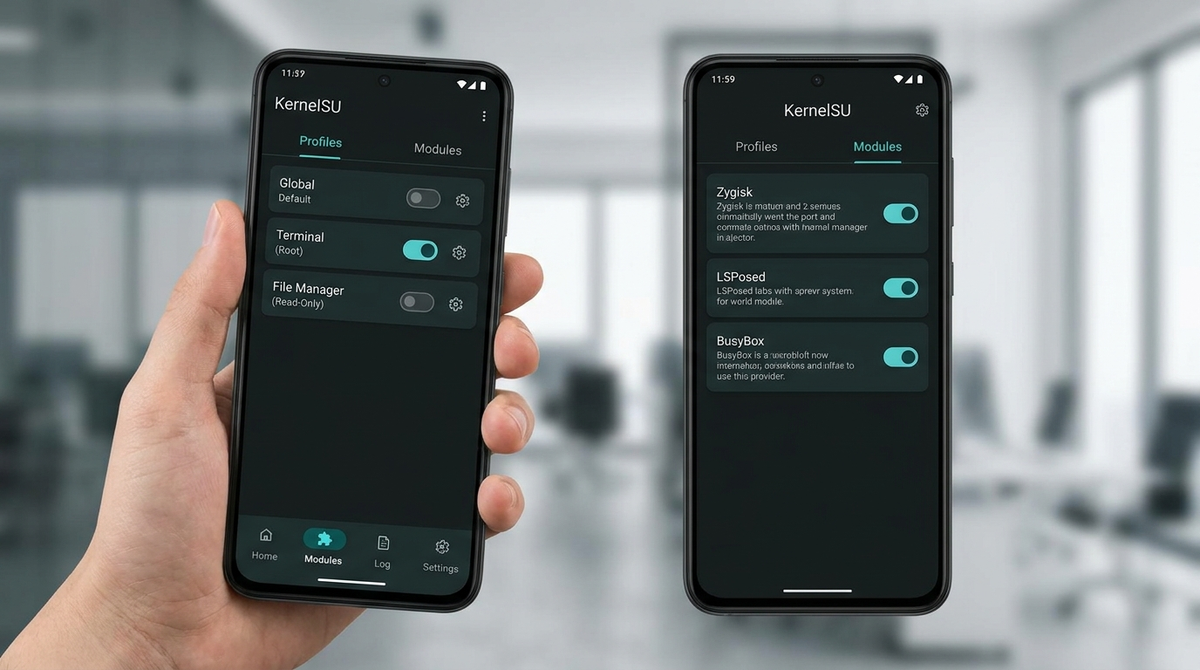
KernelSU supports a module system much like Magisk's, mounting changes via OverlayFS or Magic Mount. Most Magisk modules are compatible, though /system modifications need a metamodule such as meta-overlayfs.
KernelSU does not include Zygisk (the code-injection framework many modules rely on). To run Zygisk-dependent modules like Shamiko or LSPosed, install a standalone implementation — ZygiskNext (also called NeoZygisk) or ReZygisk — as a module first, reboot, and only then install the modules that need it. Do not try to use Magisk's built-in Zygisk on KernelSU; they are incompatible.
For root hiding, the kernel-level tool of choice is SUSFS (a su-stealth filesystem framework). It hides root-related paths from inside the kernel, which is far harder to defeat than user-space hiding. SUSFS requires kernel support built in at compile time, which is one reason KernelSU-Next and similar forks (with SUSFS compiled into their kernels) are popular for stealth setups. SUSFS is only for kernel-level root managers — it is not used with Magisk.
Will it pass banking apps and Play Integrity?
Be realistic here, because this is where a lot of misinformation circulates. KernelSU on its own does not pass Google's Play Integrity checks. People assemble a stack — ZygiskNext or ReZygisk, plus Play Integrity Fix and/or Tricky Store — to try to satisfy the various integrity levels.
The honest position: on Android 13 and higher, the DEVICE integrity verdict requires hardware-backed proof that the bootloader is locked. An unlocked bootloader is mandatory for KernelSU, so it directly disqualifies the device unless spoofing tools intervene — and that is a cat-and-mouse game Google actively closes. Methods that worked in early 2025 may stop working without updated modules. No tool can promise to defeat a specific bank's detection, and nobody should claim otherwise.
One scam to know about: legitimate "keyboxes" (the attestation keys some spoofing setups want) cannot be extracted from a device. Anyone selling an "extracted keybox" is selling either nothing or a stolen, soon-to-be-revoked key. Avoid them.
The real risks
- Data loss: unlocking the bootloader wipes the device. Back up everything first.
- Bricking: flashing a kernel with the wrong KMI, format or an older security patch can cause a hard bootloop. Your stock backups are what save you.
- Warranty and security state: unlocking is permanent on many OEMs (Samsung Knox, some Motorola/HTC). Re-locking does not restore the original security state.
- OTA updates: a full update overwrites the boot/init_boot partition and removes KernelSU. Re-flashing an old KernelSU kernel over new firmware can cause a security-patch regression that trips anti-rollback on the next update.
- Module trust: KernelSU modules run with kernel-level trust. A malicious or buggy one can hard-brick the phone or open serious holes. Install only from sources you trust.
-
Reduced security model: any root weakens Android's sandboxing. An app that tricks you into granting
sugains enormous control. App Profile reduces this risk but does not remove it.
Frequently asked questions
Is KernelSU better than Magisk?
Neither is universally better. KernelSU offers kernel-level isolation and granular per-app control but needs a GKI 2.0 or custom kernel. Magisk runs on far more devices. Choose based on your hardware and goals.
What is the difference between KernelSU and KernelSU-Next?
KernelSU is the original, now focusing tightly on aarch64 GKI 2.0. KernelSU-Next is a community fork that keeps adding compatibility (including older non-GKI kernels), ships more pre-built modules, and has built-in SUSFS hiding controls.
Do I need to unlock my bootloader?
Yes. An unlocked bootloader is mandatory, and unlocking wipes your data. On Samsung it also trips the Knox e-fuse permanently.
Will an OTA update remove KernelSU?
Generally yes. A full update overwrites the patched partition. You will need to re-patch after updating; LKM mode makes recovery quicker but does not avoid it.
Can KernelSU run on GrapheneOS?
No. GrapheneOS's hardened verified boot rejects unsigned kernels by design, so KernelSU is incompatible.
Does KernelSU work on older, non-GKI phones?
Only via KernelSU-Next, and only by compiling a custom kernel from your device's source. This is advanced and unsupported for most models — research your specific device thoroughly first.
The bottom line
KernelSU and KernelSU-Next represent the modern, kernel-level approach to Android root: cleaner isolation, finer per-app control, and strong hiding when paired with SUSFS — all on the condition that you have a compatible kernel and an unlocked bootloader. The trade-offs are real, from permanent warranty effects to the ongoing arms race with app-integrity checks. Understand your exact device, back up before you touch anything, and treat every "this defeats detection" promise with scepticism. If you would rather have a privacy-first phone configured correctly without the flashing risk, that is the kind of thing the team at PrivacyPortal can help you with.
Modules, apps & files to try
Here are the actual tools the rooting community uses for this, each linked to its official source. They're third-party community projects, so download only from the official page below, back up your boot.img first, and follow each project's own instructions. PrivacyPortal isn't affiliated with these projects and can't guarantee third-party files — flash at your own risk.
| File | What it is & how to use it safely |
|---|---|
| KernelSU (GITHUB) | The original kernel-based root manager — implements root as a kernel module rather than patching the boot ramdisk like Magisk; needs a GKI 2.0 or KernelSU-supported kernel. Official open-source (GPL) project, actively maintained — latest KernelSU v3.2.4 (Apr 2026). Kernel-level root requires a GKI 2.0 / kernel 5.10+ device (older 4.14+ kernels need a manually built kernel). Only download from the official GitHub Releases page (github.com/tiann/KernelSU/releases), never a Telegram link or mirror; verify the .apk/kernel matches your exact device and back up your boot.img before flashing, as a bad kernel image can bootloop the device. The companion KernelSU-Next fork (github.com/KernelSU-Next/KernelSU-Next) is also legitimate and supports wider kernel ranges (4.4–6.6). |
| KernelSU-Next (KSUN) (GITHUB) | Actively maintained KernelSU successor/fork by RifsxD with enhanced root hiding, magic mount, manual-hook support for non-GKI kernels, and integrated SUSFS GKI image support. Legitimate open-source (GPL) KernelSU fork — the candidate link rifsxd/KernelSU-Next 301-redirects to the canonical org repo. Actively maintained (v3.2.0, April 2026). Kernel-level root is high-risk: back up your boot.img before flashing, match the manager and kernel module versions, and download ONLY from this official GitHub repo/releases page (or the official kernelsu-next.github.io docs) — never from Telegram or mirror sites. Note the wider KernelSU ecosystem had a manager-impersonation root flaw in an old version, so always run a current release. |
| SukiSU-Ultra (GITHUB) | Feature-rich KernelSU fork that adds a KPM (Kernel Patch Module) system and auto-updating GKI builds; ships a signed manager APK. Legitimate open-source KernelSU fork (adds KPM + built-in SUSFS). Releases are GPG-signed by ShirkNeko; latest is v4.1.3 (2 Jun 2026). It is a kernel-level root tool, so download ONLY from this official GitHub releases page, verify the signature, and BACK UP your boot.img before flashing — a wrong/mismatched kernel can bootloop the device. No malware/scam/keybox-selling evidence found. |
| SUSFS (susfs4ksu) (GITHUB) | Kernel-level filesystem-hiding patch plus companion userspace module that hides root files, mounts and paths at the VFS/syscall layer; requires a kernel built with the SUSFS patch. Advanced root-hiding tool for experienced users only. It is the userspace companion module and ONLY works on a kernel already built with the upstream SUSFS patch (gitlab.com/simonpunk/susfs4ksu); installing it alone does nothing. Download only from the official repo (github.com/sidex15/susfs4ksu-module/releases) — never from reuploads or Telegram mirrors, which are common malware vectors in the rooting scene. Always back up your boot.img before flashing any kernel/module, and understand that root-hiding can break banking/Play Integrity in ways that are hard to undo. SUSFS hides root; it does not (and cannot) "extract" or generate Play Integrity keyboxes — ignore anyone bundling it with paid keybox offers. |
| ReZygisk (GITHUB) | Standalone open-source Zygisk (Zygote injection) implementation by PerformanC that works with KernelSU, KSUN, SukiSU and APatch. Legitimate FOSS module (GPL-3.0) by PerformanC — a fully open-source rewrite of the now-closed-source Zygisk Next that brings the Zygisk API to KernelSU, APatch and Magisk. Verified canonical: the official PerformanC/ReZygisk repo is not a fork, not archived, ~3.6k stars, last updated June 2026, with v1.0.0 released 10 May 2026. Only download the signed release .zip from this GitHub Releases page (avoid the many mirror forks). It is a root module that runs with superuser privileges, so flash it through your root manager's Modules section and back up your boot.img / have a recovery path before flashing. |
| Zygisk Next (GITHUB) | Reimplementation of Zygisk as a standalone module for KernelSU and APatch (NeoZygisk is the community-maintained successor); the alternative to ReZygisk. Legitimate, widely-used community root module (official repo: Dr-TSNG/ZygiskNext, 9.8k stars, latest v1.4.0 released 18 Jun 2026). Provides the Zygisk API to KernelSU, APatch, and Magisk. Only download the flashable zip from this official GitHub releases page and verify the SHA256 checksum; never from Telegram/mirror sites. Back up your boot.img before flashing any root module. Note for readers: builds after v0.9.1.1 are released under a proprietary, source-unavailable licence; the fully open-source community alternatives are NeoZygisk (github.com/JingMatrix/NeoZygisk) and ReZygisk (github.com/PerformanC/ReZygisk). |
PrivacyPortal sells ready-to-use, de-Googled GrapheneOS Pixels — hardened, kept updated, and shipped with our encrypted Graphite messenger. Browse privacy phones →


